Showing posts with label CTCSS decoder. Show all posts

16 July 2025

Debugging ESP32 Timer Interrupts: A Tale of API Compatibility


The Silent Signal Generator


Have you ever spent hours debugging code that should work but doesn't? Recently, I faced this exact challenge with an ESP32-based signal generator project. The symptoms were perplexing: all configuration parameters were correctly set, the web interface was working flawlessly, but the CTCSS tone output was completely silent. The culprit? 

A timer interrupt that refused to fire...

The Setup

The project uses an ESP32 to generate precise CTCSS (Continuous Tone-Coded Squelch System) tones for radio applications with  a GPS to "discipline" the time for 0.5% or less accuracy. 

Yeah! Overkill, I know, but the architecture is straightforward:

  1. A web interface for controlling tone parameters (frequency, level, on/off)

  2. WebSockets for real-time communication

  3. A timer interrupt running at 10 kHz to drive the DAC output

  4. Direct Digital Synthesis (DDS) with a sine lookup table for waveform generation

Everything seemed perfect in theory, but in practice, the DAC remained stubbornly silent.

The Investigation: Hours of Head-Scratching


What followed were countless hours of frustrating debugging and head-scratching. I tried everything: different timer configurations, checking hardware connections, simplifying the code, even rewriting the interrupt handler from scratch. I attempted various approaches: minimizing critical sections to reduce conflicts with WebSockets, trying different timer frequencies, toggling GPIO pins to verify hardware functionality, and even considering direct register access to bypass the Arduino API entirely. Nothing worked. The timer stubbornly refused to fire its interrupt, and the oscilloscope showed a flat line where a beautiful sine wave should have been.

The extensive debug logged every aspect of the system and for no reason, the interrupt was silent. 

At one point, my frustration reached such heights that I was ready to abandon the Arduino framework entirely and start learning Assembler or Machine Code just to manipulate the ESP32's DAC at the lowest possible level. 

Anything to get that stubborn signal flowing! A pattern finally emerged: the timer was being initialized correctly (the code was compiling and running without errors), but the interrupt service routine (ISR) counter remained at zero. This meant the timer was configured but never actually firing its interrupt.

[DIRECT DEBUG] Timer status check:
ISR counter value: 0
CTCSS enabled: YES
CTCSS frequency: 100.00
Timer initialized: YES

The code was using the ESP32 Arduino Core 3.2.1, and the timer setup looked correct:

timer = timerBegin(timerFreq);
timerAttachInterrupt(timer, &onTimer);
timerAlarm(timer, alarmValue, autoReload, reloadCount);
timerStart(timer);


The Breakthrough: API Version Matters

After multiple failed attempts to fix the issue within the 3.2.1 framework, I discovered something crucial: ESP32 Arduino Core versions have significantly different timer APIs.

The newer 3.2.1 version had simplified the API, removing critical parameters like timer number selection and edge-triggered interrupt options. These simplifications made the API easier to use but less powerful for specialized applications like precise signal generation.


The Solution: Strategic Downgrade

The solution was to downgrade to ESP32 Arduino Core 2.0.9, which offers a more comprehensive timer API. This allowed explicit control over:

1. Timer selection - Using Timer 1 to avoid conflicts with system functions

2. Edge-triggered interrupts - For more responsive and reliable timing

3. Precise prescaler settings - For accurate frequency generation

The updated code looked like this:

// ESP32 Arduino Core 2.0.9 API with explicit timer number
int timerNumber = 1; // Using timer 1 to avoid conflicts
uint16_t prescaler = 80; // 80MHz / 80 = 1MHz timer frequency

timer = timerBegin(timerNumber, prescaler, true); // true = count up
timerAttachInterrupt(timer, &onTimer, true); // true = edge triggered

uint32_t alarmValue = 1000000 / DDS_SAMPLE_RATE; // 100 ticks for 10kHz
timerAlarmWrite(timer, alarmValue, true); // true = auto reload
timerAlarmEnable(timer);


The Results

The results were immediate and impressive:

[DIRECT DEBUG] Timer status check:
ISR counter value: 2232839
CTCSS enabled: YES
CTCSS frequency: 254.00
Timer initialized: YES

[INFO] ISR count: 2240000, Time since last report: 1003 ms
[INFO] Actual interrupt frequency: 9970.09 Hz (expected: 10000 Hz)
[INFO] DAC output active: yes, CTCSS enabled: yes

The timer was now firing at approximately 9970-9980 Hz (within 0.3% of the target 10 kHz), and the oscilloscope confirmed a clean CTCSS signal output from the DAC.


Key Takeaways

1. API Compatibility Matters: Always check API compatibility when upgrading frameworks or libraries. What works in one version may not work in another, even if the code compiles without errors.

2. Explicit is Better than Implicit: When working with hardware-level features like timers, explicit control often yields better results than simplified APIs.

3. Effective Debugging: Implement counters and detailed logging to make invisible problems visible. The ISR counter was crucial in diagnosing this issue.

4. Sometimes Downgrading is Upgrading: Don't be afraid to use an older version if it offers functionality that better suits your specific needs.

Conclusion: From Frustration to Triumph

After hours of pulling my hair out (not quite) and questioning my sanity (and programming abilities - truly!), the solution turned out to be something I never would have guessed initially. 

Those moments when you stare at perfectly valid code that simply won't work are some of the most frustrating in an amateur developer's life. Yet they're also the moments that teach us the most.

This experience reinforced an important lesson in embedded systems development: understanding the underlying hardware and API capabilities is just as important as writing correct code. Sometimes the most elegant solution isn't using the latest version, but rather the version that gives you the control you need.

The relief when seeing that ISR counter finally incrementing was indescribable. The ESP32 Signal Generator now produces perfect CTCSS tones with rock-solid timing, proving that with the right approach, even the most stubborn bugs can be conquered. The countless hours of head-scratching were ultimately worth it, not just for the working project, but for the deeper understanding gained along the way.

Have you encountered similar API compatibility issues in your projects? Share your experiences in the comments below!

18 January 2015

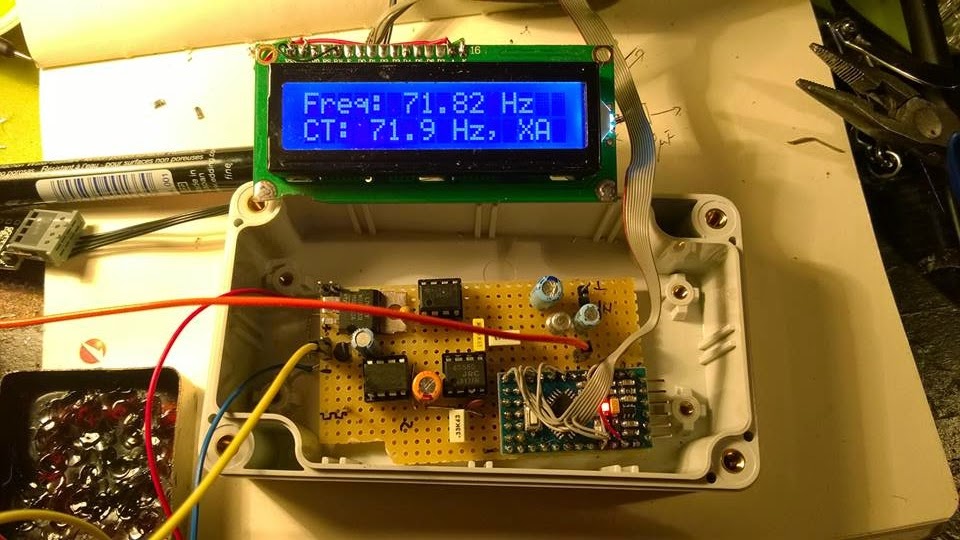
CTCSS decoder with Arduino

From a friend of mine i got an ideea for a complex repeater controller, able to work with 4 radios. Two of them forming a UHF repeater and, at least, two other, forming a second repeater or simplex radios for linking the first repeater with other remote repeaters.
But this is not the subject here...


The first step was to check the possibility to decode CTCSS and to generate it back. But decoding was the biggest challenge.
I was looking for some CML circuits but the representative here asked me to buy a large quantity at a big price.
So I was turning to my Arduino trying to figure it out how to make it able to decode CTCSS in no more than 100 msec.
Finally, I did it by measuring the pulses between interrupts and find this method pretty nice and precise, at least for a crystal resonator driven Arduino.

*** Refinements of the initial code was further made by Jean-Jacques ON7EQ   and  Paul ON4ADI. Please, read to the end.


Here is the code, just copy/paste it in the Arduino IDE:
// Frequency counter sketch, for measuring frequencies low enough to execute an interrupt for each cycle
// Connect the frequency source to the INT0 pin (digital pin 2 on an Arduino Uno)
// By Adrian, YO3HJV
// This work is released to Public Domain
// First published on January, 18th 2015 on
// http://yo3hjv.blogspot.ro/2015/01/ctcss-decoder-with-arduino.html
// This code can be used for free but I will appreciate if you mention the author.
// 73 de Adrian, YO3HJV


#include
#include
/ *May be uncomment for standard Arduino LCD library.
I am using a weird library here... */
LiquidCrystal lcd(8, 9, 4, 5, 6, 7); // set for my configuration. Let PIN2 to be the input for the signal.
volatile unsigned long timpPrimImpuls;
volatile unsigned long timpUltimImpuls;
volatile unsigned long numImpuls;
void setup()
{
//Serial.begin(19200); // print for debugging. Uncomment if necessary
lcd.begin(16, 2);
}
// Measure the frequency over the specified sample time in milliseconds, returning the frequency in Hz
float readFrequency(unsigned int sampleTime)
{
numImpuls = 0; // start a new reading
attachInterrupt(0, counter, RISING); // enable the interrupt
delay(sampleTime);
detachInterrupt(0);
return (numImpuls < 3) ? 0 : (996500.0 * (float)(numImpuls - 2))/(float)(timpUltimImpuls - timpPrimImpuls);
}
// NOTE: 996500.0 is the value find by me. The theoretic value is "1000000000.0"
// Start with this value and check the precision against a good frequency meter.
void loop()
{
float freq = readFrequency(100);
lcd.setCursor(0, 0);
lcd.print("Freq: ");
lcd.print (freq);
lcd.print(" ");
lcd.print("Hz ");
lcd.setCursor (0, 1);
// Too low but over 10 Hz
if ((freq > 10) && (freq < 65.8))
{
lcd.print(" TOO LOW ");
//DO SOMETHING
}
else if ((freq > 66.00) && (freq < 68.00))
{
lcd.print("CT: 67.0 Hz, XZ ");
//DO SOMETHING
}
else if ((freq > 68.30) && (freq < 70.30))
{
lcd.print("CT: 69.3 Hz, WZ ");
//DO SOMETHING
}
else if ((freq > 70.90) && (freq < 72.90))
{
lcd.print("CT: 71.9 Hz, XA ");
//DO SOMETHING
}
else if ((freq > 73.40) && (freq < 75.40))
{
lcd.print("CT: 74.4 Hz, WA ");
//DO SOMETHING
}
else if ((freq > 76.00) && (freq < 78.00))
{
lcd.print("CT: 77.0 Hz, XB ");
//DO SOMETHING
}
else if ((freq > 78.70) && (freq < 79.70))
{
lcd.print("CT: 79.70 Hz, WB ");
//DO SOMETHING
}
else if ((freq > 81.50) && (freq < 83.50))
{
lcd.print("CT: 82.5 Hz, YZ ");
//DO SOMETHING
}
else if ((freq > 84.30) && (freq < 86.50))
{
lcd.print("CT: 85.4 Hz, YA ");
//DO SOMETHING
}
else if ((freq > 87.40) && (freq < 89.60))
{
lcd.print("CT: 88.5 Hz, YB ");
//DO SOMETHING
}
else if ((freq > 90.40) && (freq < 92.60))
{
lcd.print("CT: 91.5 Hz, ZZ ");
//DO SOMETHING
}
else if ((freq > 93.7) && (freq < 95.90))
{
lcd.print("CT: 94.8 Hz, ZA ");
//DO SOMETHING
}
else if ((freq > 96.30) && (freq < 98.5))
{
lcd.print("CT: 97.4 Hz, ZB ");
//DO SOMETHING
}
else if ((freq > 99.00) && (freq < 101.00))
{
lcd.print("CT: 100.0 Hz, 1Z ");
//DO SOMETHING
}
else if ((freq > 102.40) && (freq < 104.60))
{
lcd.print("CT: 103.5 Hz, 1A ");
//DO SOMETHING
}
else if ((freq > 106.10) && (freq < 108.30))
{
lcd.print("CT: 107.2 Hz, 1B ");
//DO SOMETHING
}
else if ((freq > 109.80) && (freq < 112.00))
{
lcd.print("CT: 110.9 Hz, 2Z ");
//DO SOMETHING
}
else if ((freq > 113.60) && (freq < 116.00))
{
lcd.print("CT: 114.8 Hz, 2A ");
//DO SOMETHING
}
else if ((freq > 117.60) && (freq < 119.90))
{
lcd.print("CT: 118.8 Hz, 2B ");
//DO SOMETHING
}
else if ((freq > 122.00) && (freq < 124.00))
{
lcd.print("CT: 123.0 Hz, 3Z ");
//DO SOMETHING
}
else if ((freq > 126.20) && (freq < 128.40))
{
lcd.print("CT: 127.3 Hz, 3A ");
}
else if ((freq > 130.40) && (freq < 133.00))
{
lcd.print("CT: 131.8 Hz, 3B ");
}
else if ((freq > 135.00) && (freq < 138.00))
{
lcd.print("CT: 136.5 Hz, 4Z ");
//DO SOMETHING
}
else if ((freq > 140.00) && (freq < 142.80))
{
lcd.print("CT: 141.3 Hz, 4A ");
//DO SOMETHING
}
else if ((freq > 145.00) && (freq < 147.80))
{
lcd.print("CT: 146.2 Hz, 4B ");
//DO SOMETHING
}
else if ((freq > 150.00) && (freq < 152.80))
{
lcd.print("CT: 151.4 Hz, 5Z ");
//DO SOMETHING
}
else if ((freq > 156.00) && (freq < 158.80))
{
lcd.print("CT: 157.7 Hz, 5A ");
//DO SOMETHING
}
// NON-STANDARD
else if ((freq > 159.00) && (freq < 161.00))
{
lcd.print("CT: 159.8 Hz, -- ");
//DO SOMETHING
}
else if ((freq > 161.00) && (freq < 163.50))
{
lcd.print("CT: 162.2 Hz, 5B ");
//DO SOMETHING
}
// NON-STANDARD
else if ((freq > 164.00) && (freq < 166.30))
{
lcd.print("CT: 165.5 Hz, -- ");
//DO SOMETHING
}
else if ((freq > 166.60) && (freq < 169.00))
{
lcd.print("CT: 167.9 Hz, 6Z ");
//DO SOMETHING
}
// NON-STANDARD
else if ((freq > 170.00) && (freq < 172.40))
{
lcd.print("CT: 171.3 Hz, -- ");
//DO SOMETHING
}
else if ((freq > 172.60) && (freq < 175.00))
{
lcd.print("CT: 173.8 Hz, 6A ");
//DO SOMETHING
}
//NON-STANDARD
else if ((freq > 176.00) && (freq < 178.50))
{
lcd.print("CT: 177.3 Hz, -- ");
//DO SOMETHING
}
else if ((freq > 178.6) && (freq < 181.00))
{
lcd.print("CT: 179.9 Hz, 6Z ");
//DO SOMETHING
}
//NON-STANDARD
else if ((freq > 182.00) && (freq < 184.80))
{
lcd.print("CT: 183.5 Hz, -- ");
//DO SOMETHING
}
else if ((freq > 185.00) && (freq < 187.50))
{
lcd.print("CT: 186.2 Hz, 7Z ");
//DO SOMETHING
}
//NON-STANRDARD
else if ((freq > 188.40) && (freq < 191.30))
{
lcd.print("CT: 189.9 Hz, -- ");
//DO SOMETHING
}
else if ((freq > 191.00) && (freq < 194.00))
{
lcd.print("CT: 192.8 Hz, 7A ");
//DO SOMETHING
}
//NON-STANDARD
else if ((freq > 195.40) && (freq < 198.00))
{
lcd.print("CT: 196.6 Hz, -- ");
//DO SOMETHING
}
//NON-STANDARD
else if ((freq > 198.30) && (freq < 201.00))
{
lcd.print("CT: 199.5 Hz, -- ");
//DO SOMETHING
}
else if ((freq > 202.00) && (freq < 204.00))
{
lcd.print("CT: 203.5 Hz, M1 ");
//DO SOMETHING
}
else if ((freq > 205.00) && (freq < 208.00))
{
lcd.print("CT: 206.5 Hz, 8Z ");
//DO SOMETHING
}
else if ((freq > 209) && (freq < 212.00))
{
lcd.print("CT: 210.7 Hz, M2 ");
//DO SOMETHING
}
else if ((freq > 217.00) && (freq < 219.30))
{
lcd.print("CT: 218.1 Hz, M3 ");
}
else if ((freq > 224.00) && (freq < 227.00))
{
lcd.print("CT: 225.7 Hz, M4 ");
}
else if ((freq > 227.60) && (freq < 231.30))
{
lcd.print("CT: 229.1 Hz, 9Z ");
//DO SOMETHING
}
else if ((freq > 231.70) && (freq < 235.00))
{
lcd.print("CT: 233.6 Hz, -- ");
//DO SOMETHING
}
else if ((freq > 239.60) && (freq < 243.00))
{
lcd.print("CT: 241.8 Hz, M6 ");
//DO SOMETHING
}
else if ((freq > 248.00) && (freq < 252.00))
{
lcd.print("CT: 250.3 Hz, M7 ");
//DO SOMETHING
}
else if ((freq > 252.70) && (freq < 256.80))
{
lcd.print("CT: 254.1 Hz, 0Z ");
//DO SOMETHING
}
else if (freq > 256.80)
{
lcd.print(" TOO HIGH ");
//DO SOMETHING
}
else
{
lcd.setCursor (0, 1);
lcd.print(" NOISE ");
// or, comment the line above and
// uncomment the line below for an empty LCD line
// lcd.print(" ");
}
delay(50);
// lcd.clear(); //Not necessary. uncomment but will flicker!
} //END OF LOOP
void counter()
{
unsigned long now = micros();
if (numImpuls == 1)
{
timpPrimImpuls = now;
}
else
{
timpUltimImpuls = now;
}
++numImpuls;
}


After fine tuning the code, the second issue was to make the Arduino read from real life signals, a.k.a from the discriminator (FM detector).
But there, unfortunately, there is also "noise" above 300 Hz from the voice and the Arduino will tend to detect it too, asuming that we have a 5Vpp signal on pin 2 of the UNO board.
Therefore, a preamplifier and a Low Pass Filter to cut all the frequencies below* above 260 Hz with at least 12db/octave.
I will not bother you with more than necessary details, I post the schematics here and if someone has questions i will answer.

73 de Adrian YO3HJV


A "Later Edit" is a must!
After some emails with Carlo IU1DOR found some mistakes in the schematics. One is about the parallel diodes at U3a which are drawn as conductive in one sense; must be corrected as anti-parallel diodes.
The second one is R10 which is not in series with that diodes.

Here is the original part from Motorola GM300 schematics:


Anyway, Carlo kindly give me the permission to post here the PCB layout for the filter (TNX!):


The code is available on GITHUB. 
*-TNX  IU1DOR for correction!

LATER EDIT  (15 feb. 2016)
I recently received a e-mail from Jean-Jacques ON7EQ   who pointed me to an upgrade to this project.
The upgrade was made possible by the work of Paul ON4ADI who refine the code and added a necessary software filter to make the CTCSS Arduino decoder able to withstand to real world conditions.
The project of the new CTCSS decoder can be seen here.


Most viewed posts in last 30 days