Showing posts with label homebrew. Show all posts

03 December 2020

Shack dual time Clock with POS VFD

A few years ago I came around a nice POS Vacuum Fluorescent Display.

The model I have is CD7220 and it is designed to show information about a customer purchasing  in a nice blue-green colour onto a Vacuum Fluorescent Display with 2 rows and 20 columns.

I put it on my bench and gave it a long look seeing on it's two rows a lot of possible things. From clock to some informations extracted from CI-V from my ICOM radios, various configurations scrolled in my imagination.

I started to search for some documentation and found the datasheet then started to look inside to see how it was interfaced with the POS cashier machine.

The VFD is interfaced via RJ45 connector and from the signal perspective, a HIN232 circuit handle the conversion between RS232 serial COM port to TTL UART. Basically, this circuit is a clone of Maxim's MAX232 RS232<>TTL level convertor.

To drive the VFD I choosed a small Arduino NANO; the RTC is a DS1307.

The backup battery, a rechargable Li cell was dead and I replaced with a 5 V/4F capacitor. This is enough to keep the time for some time when power is off.

Because the circuits in the VFD need 24V, I put inside a DC/DC boost convertor so I can power the board with anything above 5V and below 24V.  Yeah, I know, this is too big for this project but this was laying on my junk boxes here... You can use any boost DC/TS that can sustain 5W in a close box for extended periods of time.

The RTC module is connected to Arduino via I2C.

To set the RTC actual Time and Date I used the example that came with the DS1307 library; just upload it into the Nano and start Serial monitor.

After setting the Time and Date as above, use the code provided on the Github, insert the correct UTC offset for your region and then upload the code to Arduino.

The code is commented and it is self explanatory; before you upload it, check the correct offset for UTC. 


31 May 2018

Colectie link-uri pentru un receptor/transceiver HF

https://martein.home.xs4all.nl/pa3ake/hmode/ar7070-progress.html

http://www.robkalmeijer.nl/techniek/electronica/radiotechniek/hambladen/qst/1994/06/page27/index.html

AOR 7070 roofing filters 45.1 MHz: http://www.arrl.org/files/file/QEX_Next_Issue/Jul-Aug_2013/QEX_7_13_Horrabin.pdf

https://martein.home.xs4all.nl/pa3ake/hmode/index.html

Ete na, ca sa vezi!  http://www.hfsignals.com/index.php/ubitx-circuit-description/

18 January 2015

CTCSS decoder with Arduino

From a friend of mine i got an ideea for a complex repeater controller, able to work with 4 radios. Two of them forming a UHF repeater and, at least, two other, forming a second repeater or simplex radios for linking the first repeater with other remote repeaters.
But this is not the subject here...


The first step was to check the possibility to decode CTCSS and to generate it back. But decoding was the biggest challenge.
I was looking for some CML circuits but the representative here asked me to buy a large quantity at a big price.
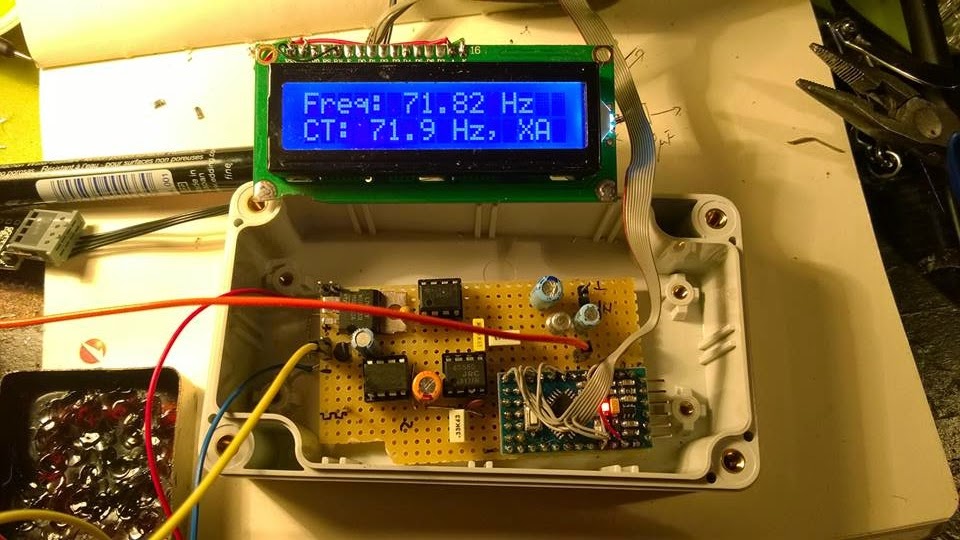
So I was turning to my Arduino trying to figure it out how to make it able to decode CTCSS in no more than 100 msec.
Finally, I did it by measuring the pulses between interrupts and find this method pretty nice and precise, at least for a crystal resonator driven Arduino.

*** Refinements of the initial code was further made by Jean-Jacques ON7EQ   and  Paul ON4ADI. Please, read to the end.


Here is the code, just copy/paste it in the Arduino IDE:
// Frequency counter sketch, for measuring frequencies low enough to execute an interrupt for each cycle
// Connect the frequency source to the INT0 pin (digital pin 2 on an Arduino Uno)
// By Adrian, YO3HJV
// This work is released to Public Domain
// First published on January, 18th 2015 on
// http://yo3hjv.blogspot.ro/2015/01/ctcss-decoder-with-arduino.html
// This code can be used for free but I will appreciate if you mention the author.
// 73 de Adrian, YO3HJV


#include
#include
/ *May be uncomment for standard Arduino LCD library.
I am using a weird library here... */
LiquidCrystal lcd(8, 9, 4, 5, 6, 7); // set for my configuration. Let PIN2 to be the input for the signal.
volatile unsigned long timpPrimImpuls;
volatile unsigned long timpUltimImpuls;
volatile unsigned long numImpuls;
void setup()
{
//Serial.begin(19200); // print for debugging. Uncomment if necessary
lcd.begin(16, 2);
}
// Measure the frequency over the specified sample time in milliseconds, returning the frequency in Hz
float readFrequency(unsigned int sampleTime)
{
numImpuls = 0; // start a new reading
attachInterrupt(0, counter, RISING); // enable the interrupt
delay(sampleTime);
detachInterrupt(0);
return (numImpuls < 3) ? 0 : (996500.0 * (float)(numImpuls - 2))/(float)(timpUltimImpuls - timpPrimImpuls);
}
// NOTE: 996500.0 is the value find by me. The theoretic value is "1000000000.0"
// Start with this value and check the precision against a good frequency meter.
void loop()
{
float freq = readFrequency(100);
lcd.setCursor(0, 0);
lcd.print("Freq: ");
lcd.print (freq);
lcd.print(" ");
lcd.print("Hz ");
lcd.setCursor (0, 1);
// Too low but over 10 Hz
if ((freq > 10) && (freq < 65.8))
{
lcd.print(" TOO LOW ");
//DO SOMETHING
}
else if ((freq > 66.00) && (freq < 68.00))
{
lcd.print("CT: 67.0 Hz, XZ ");
//DO SOMETHING
}
else if ((freq > 68.30) && (freq < 70.30))
{
lcd.print("CT: 69.3 Hz, WZ ");
//DO SOMETHING
}
else if ((freq > 70.90) && (freq < 72.90))
{
lcd.print("CT: 71.9 Hz, XA ");
//DO SOMETHING
}
else if ((freq > 73.40) && (freq < 75.40))
{
lcd.print("CT: 74.4 Hz, WA ");
//DO SOMETHING
}
else if ((freq > 76.00) && (freq < 78.00))
{
lcd.print("CT: 77.0 Hz, XB ");
//DO SOMETHING
}
else if ((freq > 78.70) && (freq < 79.70))
{
lcd.print("CT: 79.70 Hz, WB ");
//DO SOMETHING
}
else if ((freq > 81.50) && (freq < 83.50))
{
lcd.print("CT: 82.5 Hz, YZ ");
//DO SOMETHING
}
else if ((freq > 84.30) && (freq < 86.50))
{
lcd.print("CT: 85.4 Hz, YA ");
//DO SOMETHING
}
else if ((freq > 87.40) && (freq < 89.60))
{
lcd.print("CT: 88.5 Hz, YB ");
//DO SOMETHING
}
else if ((freq > 90.40) && (freq < 92.60))
{
lcd.print("CT: 91.5 Hz, ZZ ");
//DO SOMETHING
}
else if ((freq > 93.7) && (freq < 95.90))
{
lcd.print("CT: 94.8 Hz, ZA ");
//DO SOMETHING
}
else if ((freq > 96.30) && (freq < 98.5))
{
lcd.print("CT: 97.4 Hz, ZB ");
//DO SOMETHING
}
else if ((freq > 99.00) && (freq < 101.00))
{
lcd.print("CT: 100.0 Hz, 1Z ");
//DO SOMETHING
}
else if ((freq > 102.40) && (freq < 104.60))
{
lcd.print("CT: 103.5 Hz, 1A ");
//DO SOMETHING
}
else if ((freq > 106.10) && (freq < 108.30))
{
lcd.print("CT: 107.2 Hz, 1B ");
//DO SOMETHING
}
else if ((freq > 109.80) && (freq < 112.00))
{
lcd.print("CT: 110.9 Hz, 2Z ");
//DO SOMETHING
}
else if ((freq > 113.60) && (freq < 116.00))
{
lcd.print("CT: 114.8 Hz, 2A ");
//DO SOMETHING
}
else if ((freq > 117.60) && (freq < 119.90))
{
lcd.print("CT: 118.8 Hz, 2B ");
//DO SOMETHING
}
else if ((freq > 122.00) && (freq < 124.00))
{
lcd.print("CT: 123.0 Hz, 3Z ");
//DO SOMETHING
}
else if ((freq > 126.20) && (freq < 128.40))
{
lcd.print("CT: 127.3 Hz, 3A ");
}
else if ((freq > 130.40) && (freq < 133.00))
{
lcd.print("CT: 131.8 Hz, 3B ");
}
else if ((freq > 135.00) && (freq < 138.00))
{
lcd.print("CT: 136.5 Hz, 4Z ");
//DO SOMETHING
}
else if ((freq > 140.00) && (freq < 142.80))
{
lcd.print("CT: 141.3 Hz, 4A ");
//DO SOMETHING
}
else if ((freq > 145.00) && (freq < 147.80))
{
lcd.print("CT: 146.2 Hz, 4B ");
//DO SOMETHING
}
else if ((freq > 150.00) && (freq < 152.80))
{
lcd.print("CT: 151.4 Hz, 5Z ");
//DO SOMETHING
}
else if ((freq > 156.00) && (freq < 158.80))
{
lcd.print("CT: 157.7 Hz, 5A ");
//DO SOMETHING
}
// NON-STANDARD
else if ((freq > 159.00) && (freq < 161.00))
{
lcd.print("CT: 159.8 Hz, -- ");
//DO SOMETHING
}
else if ((freq > 161.00) && (freq < 163.50))
{
lcd.print("CT: 162.2 Hz, 5B ");
//DO SOMETHING
}
// NON-STANDARD
else if ((freq > 164.00) && (freq < 166.30))
{
lcd.print("CT: 165.5 Hz, -- ");
//DO SOMETHING
}
else if ((freq > 166.60) && (freq < 169.00))
{
lcd.print("CT: 167.9 Hz, 6Z ");
//DO SOMETHING
}
// NON-STANDARD
else if ((freq > 170.00) && (freq < 172.40))
{
lcd.print("CT: 171.3 Hz, -- ");
//DO SOMETHING
}
else if ((freq > 172.60) && (freq < 175.00))
{
lcd.print("CT: 173.8 Hz, 6A ");
//DO SOMETHING
}
//NON-STANDARD
else if ((freq > 176.00) && (freq < 178.50))
{
lcd.print("CT: 177.3 Hz, -- ");
//DO SOMETHING
}
else if ((freq > 178.6) && (freq < 181.00))
{
lcd.print("CT: 179.9 Hz, 6Z ");
//DO SOMETHING
}
//NON-STANDARD
else if ((freq > 182.00) && (freq < 184.80))
{
lcd.print("CT: 183.5 Hz, -- ");
//DO SOMETHING
}
else if ((freq > 185.00) && (freq < 187.50))
{
lcd.print("CT: 186.2 Hz, 7Z ");
//DO SOMETHING
}
//NON-STANRDARD
else if ((freq > 188.40) && (freq < 191.30))
{
lcd.print("CT: 189.9 Hz, -- ");
//DO SOMETHING
}
else if ((freq > 191.00) && (freq < 194.00))
{
lcd.print("CT: 192.8 Hz, 7A ");
//DO SOMETHING
}
//NON-STANDARD
else if ((freq > 195.40) && (freq < 198.00))
{
lcd.print("CT: 196.6 Hz, -- ");
//DO SOMETHING
}
//NON-STANDARD
else if ((freq > 198.30) && (freq < 201.00))
{
lcd.print("CT: 199.5 Hz, -- ");
//DO SOMETHING
}
else if ((freq > 202.00) && (freq < 204.00))
{
lcd.print("CT: 203.5 Hz, M1 ");
//DO SOMETHING
}
else if ((freq > 205.00) && (freq < 208.00))
{
lcd.print("CT: 206.5 Hz, 8Z ");
//DO SOMETHING
}
else if ((freq > 209) && (freq < 212.00))
{
lcd.print("CT: 210.7 Hz, M2 ");
//DO SOMETHING
}
else if ((freq > 217.00) && (freq < 219.30))
{
lcd.print("CT: 218.1 Hz, M3 ");
}
else if ((freq > 224.00) && (freq < 227.00))
{
lcd.print("CT: 225.7 Hz, M4 ");
}
else if ((freq > 227.60) && (freq < 231.30))
{
lcd.print("CT: 229.1 Hz, 9Z ");
//DO SOMETHING
}
else if ((freq > 231.70) && (freq < 235.00))
{
lcd.print("CT: 233.6 Hz, -- ");
//DO SOMETHING
}
else if ((freq > 239.60) && (freq < 243.00))
{
lcd.print("CT: 241.8 Hz, M6 ");
//DO SOMETHING
}
else if ((freq > 248.00) && (freq < 252.00))
{
lcd.print("CT: 250.3 Hz, M7 ");
//DO SOMETHING
}
else if ((freq > 252.70) && (freq < 256.80))
{
lcd.print("CT: 254.1 Hz, 0Z ");
//DO SOMETHING
}
else if (freq > 256.80)
{
lcd.print(" TOO HIGH ");
//DO SOMETHING
}
else
{
lcd.setCursor (0, 1);
lcd.print(" NOISE ");
// or, comment the line above and
// uncomment the line below for an empty LCD line
// lcd.print(" ");
}
delay(50);
// lcd.clear(); //Not necessary. uncomment but will flicker!
} //END OF LOOP
void counter()
{
unsigned long now = micros();
if (numImpuls == 1)
{
timpPrimImpuls = now;
}
else
{
timpUltimImpuls = now;
}
++numImpuls;
}


After fine tuning the code, the second issue was to make the Arduino read from real life signals, a.k.a from the discriminator (FM detector).
But there, unfortunately, there is also "noise" above 300 Hz from the voice and the Arduino will tend to detect it too, asuming that we have a 5Vpp signal on pin 2 of the UNO board.
Therefore, a preamplifier and a Low Pass Filter to cut all the frequencies below* above 260 Hz with at least 12db/octave.
I will not bother you with more than necessary details, I post the schematics here and if someone has questions i will answer.

73 de Adrian YO3HJV


A "Later Edit" is a must!
After some emails with Carlo IU1DOR found some mistakes in the schematics. One is about the parallel diodes at U3a which are drawn as conductive in one sense; must be corrected as anti-parallel diodes.
The second one is R10 which is not in series with that diodes.

Here is the original part from Motorola GM300 schematics:


Anyway, Carlo kindly give me the permission to post here the PCB layout for the filter (TNX!):


The code is available on GITHUB. 
*-TNX  IU1DOR for correction!

LATER EDIT  (15 feb. 2016)
I recently received a e-mail from Jean-Jacques ON7EQ   who pointed me to an upgrade to this project.
The upgrade was made possible by the work of Paul ON4ADI who refine the code and added a necessary software filter to make the CTCSS Arduino decoder able to withstand to real world conditions.
The project of the new CTCSS decoder can be seen here.


12 December 2014

Home made IF Filter

Today I started wondering what should I do with some quartz cristal that I have around...
A IF filter was my first thought and I started to fool around with them.
First, I cut a small piece of PCB and prepared for "dead-bug" soldering style.
I prepared also two small piece of RG58U to connect the filter to a Marconi IFR analyzer.
In my box I had two type of cristals.
One type is a 4 MHz and the second one is a 38.9 MHz, both of them HC-49U format.
First I started with the 4 MHz ones but I didn't noticed a nice shape on the analyzer so I quicly moved around to 38.9 ones.
These are overtone cristals so I watched to fundamental frequency which had to be around 12.6 MHz.
And it was!

I don't want to bother you with math stuff. Instead, I will put the self-explanatory pictures.

The two SMD resistors are 470 Ohms and the small SMD capacitors are 1nF.


Here it is the filter on the tests. After tests, it can be put on a smaller and nicer board. I didn't had capacitors, I will play with them monday, HI.
 There are 9 cristals. At less than 1 USD, I believe is a good alternative!
Indeed, one had to choose from a big bunch, but I had an already opened bag of cristals with around 25 pcs. I observed on the analyzer that there was two type of shape for that bunch.

The insertion loss is around -4db wich is not bad at all!
 The center frequency was set at 12.96400 MHz. This might be somehow unusual for elder hams but with modern DSS it's easy to set the IF to this value.


 -22db attenuation at +1.5 kHz

 -27 db attenuation at - 1.5 kHz


 It has a passband of around 1.8 kHz at -15 db. Maybe I will send it to some experimenter who want to play with because I am very curious about how it sound in the real HF traffic!


Other pictures:


05 May 2012

1 Leu Iambic CW keyer - touch version

In the quest for the comfortable iambic keyer I made a touch keyer.

The paddles are made from two "50 bani" coins (around 14 Eurocents) each.

Works nice in connection with my home made PIC memory keyer.
The keyer is based on AT42QT1012 capacitive touch sensor.


18 July 2011

Homemade USB Digimodes Interface

I am a big fan of Digimodes as you maybe know already!
Therefore, I am always in the search of the “perfect” Digi Interface which also has to allow me to control the radio via Ham Radio Deluxe, one of the best of it’s kind…
I already have a RiGExpert Standard interface but this is assigned to a Kenwood TS2000 radio at YO3KSR, our club station and this made a big “gap” in my shack.
My “ideal” interface has to be wired to a PC only with one cable.
I want to have a “hardline” PTT and a Carrier Detect (for Echolink use) and a CAT port.
Of course, a sounboard because want to be able to use the interface with some digital voice software which requires two sound boards (one in the laptop).
I made a lot of interfaces in the past; most of them was “the simple” type; only providing isolation between PC and transceiver with two little transformers and a optocoupler for PTT but these ones required a external USB2COM adapter and a lot of wires…
So, my “dream” was still in the “cloud”.

A few days ago, while I was inspecting the junk box, I found a lot of unused “components”…
A USB sound card from Behringer (UC202), some USB2COM adapters and a very little USB hub…
Hmmm… I wonder if I can use those to homebrew a nice versatile Digimodes interface!
I often see fellow hams that build things from scrap! I admire them because this need a lot of time and commitement! I have the last "thing" but I don't have the time so, I think I do not "cheat" by using demo boards or some finished "scrap" in my junk box.


Here is the plan (click to see the "big pictures"):

I choose a USB 2.0 HUB with four outputs as a simple math will show that we need 3 of them in our setup and we can use one for further "developments".
A short trip to a local DIY store provided all the necessary components; the case, the board and some LED’s because I didn’t have the green ones!


I agree with “one picture made a thousand words”, therefore I let you see what is the result.
So, I made a "motherboard" where I put the USB plug, the LED's, and the I/O volume potentiometers. There is some pads left for external DC input regulation with a 7805 circuit (not populated yet) and for isolation transformers (in the eventuality of 50 Hz hum).
I also provided some common ground because I choose not to use isolation. Hmmm, the "isolation" story seems to be a humbug of sime sort because, from what I seen in the market, the CAT port is not isolated so, despite the isolation of the audio and PTT, the PC IS connected to the transceiver! So, why try to complicate my life?
In the upper

The audio USB board UCA-202 from Behringer:
This board has a Stereo Line input and a Stereo Line Output. There is also a "monitor" headphones output, but this is not used. Maybe I will put a little speaker inside the box but is not yet necessary!
The USB2COM adapters:

The USB2COM adapters was tested before te see how they works!

If you can see them here it's a proof that they passed the test, HI!
Like I said, I used one for CAT control. This one was left "in one piece" to provide some mechanical fixing. The one for PTT and CD (Carrier Detect - Open Squelch) was removed from the DB9 connector. This was necessary because all the signals (including Audio I/O) will be sent to the transceiver via one cable).
The PTT was set on COM's RTS and the CD on the COM'S CD (to be clear, HI). Here I use two K817 optocouplers. The PTT port can whitstand about 50 mA at 70V.

The LEDs

I like to have some visual information about the working state of the interface, so I desoldered the original LED from every board and reroute them on the front panel.

From left to right:

-Blue: Power on USB HUB;

-Green: Power on CAT COM1;

-Green: Audio Board recognised by the OS;

-Red: PTT on COM2

-Yellow: CD on COM2.

-Blue: not connected.


The "look":


After closing the case, the HM Interface looked fantastic, especially in the dim light!
On the rear panel, I provided 3 RCA for Audio I/O and for PTT/ They are not wired yet.

Further development may include a second USB audio board for digital voice...

OK, it is not perfect, but the tests showed that this "box" performs well... I have only one complain: the Input level is often too small for the sound board. Despite this, the excellent S/N ratio of the Behringer board made me think twice before adding a small input preamplifier!
The two potentiometers are unused...
The cost is much under a commercial interface... Much!

And, for the final, what will be a CAT-Digimodes interface without a Tom-CAT?

73 de YO3HJV

LATER EDIT:

I added a small preamplifier (around 6 db) on the audio input of the interface. The signal goes into one of the two potentiometers (reserved on the motherboard) to fine tune the input volume. A small Switch on the front panel allow me to bypass the preamplifier because the signal from ICOM IC7000 is loud enough to drive irectly the soundboard.
I also put a 4 GB flash memory for various purposes (the HRD Logbook, audio recording of my QSO's and a small collection of digimodes software-around 300 Mb).

Most viewed posts in last 30 days